Xcode’s Latest TRICK: Using AI to Help You Build Apps
Making apps for iPhones, iPads, and Macs just got a whole lot smarter. Apple’s main tool for building these apps, called Xcode, now has new smart helpers. These helpers are powerful AI programs that can work right inside Xcode. They are here to make app creation easier and faster for everyone. Whether you’re new to making apps or you’ve been doing it for years, this update is a big deal.
What Are These New Smart Helpers in Xcode?
Xcode is getting an upgrade that allows special AI programs to join in. These aren’t just simple tools; they are like smart assistants that can do many tasks. They can understand your project, write code, test it, and even fix problems.
These smart helpers come from big names in AI, like Anthropic’s Claude Agent and OpenAI’s Codex. They are now part of Xcode version 26.3.
This new version is ready for Apple developers to download today. Soon, everyone will be able to get it from the App Store.
How These AI Helpers Make App Building Easier
These AI assistants can do a lot to simplify your work.
They can:
• Look through your project to understand what it’s about.
• Figure out how your app is put together and what its parts do.
• Help build your project.
• Run tests to find any mistakes or issues.
• Fix errors if they pop up.
The AI helpers also read all of Apple’s guides. This means they will use the latest tools and follow the best ways to build apps. They can help with discovering parts of your project, changing files, making quick previews, and more.
How Does It Work?
If you want to try these new features, getting started is simple. First, you need to download the AI helpers you want to use from Xcode’s settings. Then, you can link your accounts with the AI companies or add a special key they give you.
Inside Xcode, you’ll find a simple menu. Here, you can pick which version of the AI you want to use.
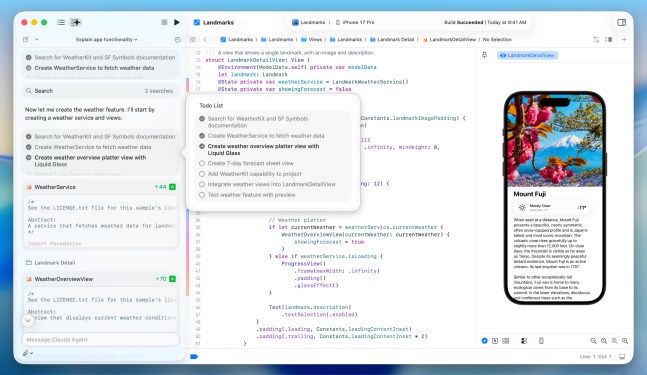
You tell the AI what you want in simple, everyday language. There’s a special box on the left side of the screen for this. For example, you could tell Xcode to add a new feature to your app. You can even explain how it should look and what it should do.
Watching the AI Work and Learning
One great thing about these AI helpers is that they are very open about what they do.
When the AI starts working:
• It breaks down big tasks into smaller, easy-to-see steps.
• It searches for the right guides it needs before writing code.
• You can see the changes happening right in your code, marked clearly.
• A special area on the side of the screen shows you what the AI is doing step-by-step.
This openness is very helpful, especially for people who are just starting to learn how to code. Apple is even holding a special workshop online to show everyone how to use these new tools.
Staying in Control and Fixing Mistakes
You are always in charge. After the AI creates code, it runs its own tests to make sure everything works well. If there are problems, the AI can even try again to fix them.
Apple shared a good tip: sometimes, asking the AI to plan its steps before it writes code can make the whole process better.
And don’t worry if you don’t like what the AI did. Xcode saves your work at different points. This means you can easily go back to an earlier version of your code at any time.
